Photography is international best-seller Michael Freeman's life, and in this book he works together with fellow photography experts to share his and their knowledge with anyone who wants to learn not only how to take better photos, but also why those photographs work and where they fit in with the history of the craft. Inspired by the structure of a college course and the benefits of a collective learning environment, this book teaches the fundamentals of photography not just through comprehensive lessons and instructions, but also through challenges in which readers can participate. Sample work from Michael's students provides inspiration, and critical evaluations of the results ensure that the core concepts are being grasped every step of the way. Additionally, readers can join in by sharing their work via the series' dedicated website.
eBook - ePub
Michael Freeman's Photo School Fundamentals
Exposure, Light & Lighting, Composition
- 352 pages
- English
- ePUB (mobile friendly)
- Available on iOS & Android
eBook - ePub
About this book
Trusted by 375,005 students
Access to over 1.5 million titles for a fair monthly price.
Study more efficiently using our study tools.
Information
DIGITAL EDITING
Editing and post-production work is often a polarizing part of digital photography. Everyone has an opinion: Some say that any departure from a completely faithful and untouched reproduction of the original subject is fraudulent; others say the sky is the limit, and you can do whatever you like to any image. As usual, the truth lies somewhere in the middle.
For one, there is no such thing as a completely faithful reproduction—the process of capturing photons, converting them into digital information, and displaying that information in a two-dimensional format requires various levels of creative interpretation at several steps along the way. And on the other hand, the more digital enhancement that goes into an image—particularly as you begin introducing special effects and adding elements that weren’t in the original scene at all, such as with composites—the closer you get to crossing a line between a photograph and a work of digital art.
This section will cover the space in between these extreme interpretations Starting with an overview of the image-editing programs available to today’s photographer, we will spend two chapters thoroughly covering your various options for image optimization—and that word is used quite intentionally. Even in more creative and subjective techniques like black-and-white conversion, the methods covered concern themselves primarily with making the most out of the latent potential within each image. The final chapter, on the other hand, covers the more open-ended topics of digital editing, in which you’ll be combining separate images into one composite, removing unwanted objects from the image, stitching together panoramas, and other techniques that delve deeper into the creative tools available in pixel-level editors.
Hide your work
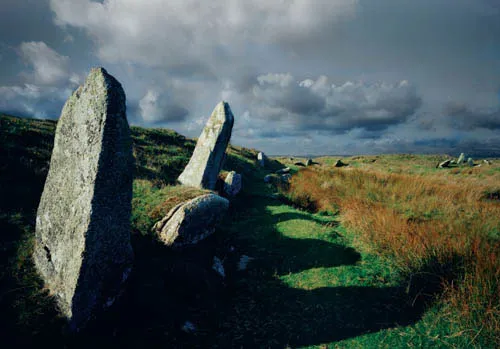
This relatively straightforward landscape has, in fact, had the sky desaturated, the greens and yellows saturated individually, and the contrast reduced by a curves adjustment. And yet, the resulting image is more faithful to the original scene.
Some of these techniques will resonate with your personal photographic style and workflow, others will likely not. However, for all the techniques discussed herein, whether or not you use them in your own photography is not nearly as important as the fact that you will be able to if needed or desired—that you recognize and are familiar with the various tools and options available, so that you can make the right decisions for each image that crosses your desktop. That is also the idea behind the Challenges scattered throughout the book: They are not meant to necessarily convince you that, say, Curves is the best tool for adjusting your shadows and highlights, or that HDR is the only technique for dealing with high-contrast situations. Rather, they are meant to get you familiar with possible courses of action, and prepare you for the wide range of photographic possibilities that you will encounter.

Clean representation
Even completely “faithful” photographs like those used in art catalogs often require some degree of optimization in post-production.
The Digital Workflow
Before we begin to look in detail at the tools and practices of digital photo editing, it’s worth spending just a brief moment or two discussing the concept of the digital photography workflow, as this will help you see where image editing fits within the broad scheme of creating a digital image.
In the context of digital photography, “workflow” describes the entire process of producing a digital image—from capture and importing, organizing and reviewing, through Raw processing and post-production, to distribution and backup. If you’re unfamiliar with any of these terms: Capture essentially means the action of taking the photograph; importing is simply transferring the image files to the computer; organizing and reviewing involve creating appropriate folders, ranking, and making a selection of your images; Raw processing and post-production (often grouped together) are concerned with optimizing the image so that it looks as good as it possibly can; distribution is primarily about preparing the image for either print or viewing on-screen; and finally, backup refers to the process of safely archiving and storing your images. Although there’s no single specific workflow for all photographs, there are definite considerations that must be taken before an image is ready for display.
Out of the workflow just described, the two areas that are of specific relevance to photo editing are Raw processing and post-production. For the purposes of this book we’ll use the term Raw processing to describe all aspects of optimizing the Raw image file once it has been downloaded to the computer; post-production, on the other hand, we’ll use to describe any aspect of optimization once the Raw file has been saved as a TIFF or JPEG. As you’ll see later, this does have a bearing on the type of software you’ll use for certain tasks.
The Raw Format
To understand Raw processing, you first need to be familiar with the Raw format. “Raw” is the generic term for the unprocessed fi...
Table of contents
- Cover
- Half Title
- Title Page
- Copyright Page
- Table of Contents
- Foreword
- Student Profiles
- Exposure
- Light & Lighting
- Composition
- Digital Editing
- Glossary
- Index
Frequently asked questions
Yes, you can cancel anytime from the Subscription tab in your account settings on the Perlego website. Your subscription will stay active until the end of your current billing period. Learn how to cancel your subscription
No, books cannot be downloaded as external files, such as PDFs, for use outside of Perlego. However, you can download books within the Perlego app for offline reading on mobile or tablet. Learn how to download books offline
We are an online textbook subscription service, where you can get access to an entire online library for less than the price of a single book per month. With over 1.5 million books across 990+ topics, we’ve got you covered! Learn about our mission
Look out for the read-aloud symbol on your next book to see if you can listen to it. The read-aloud tool reads text aloud for you, highlighting the text as it is being read. You can pause it, speed it up and slow it down. Learn more about Read Aloud
Yes! You can use the Perlego app on both iOS and Android devices to read anytime, anywhere — even offline. Perfect for commutes or when you’re on the go.
Please note we cannot support devices running on iOS 13 and Android 7 or earlier. Learn more about using the app
Please note we cannot support devices running on iOS 13 and Android 7 or earlier. Learn more about using the app
Yes, you can access Michael Freeman's Photo School Fundamentals by Michael Freeman in PDF and/or ePUB format, as well as other popular books in Media & Performing Arts & Digital Media. We have over 1.5 million books available in our catalogue for you to explore.