Working with Legacy Systems
A practical guide to looking after and maintaining the systems we inherit
- 152 pages
- English
- ePUB (mobile friendly)
- Available on iOS & Android
Working with Legacy Systems
A practical guide to looking after and maintaining the systems we inherit
About this book
Understand the crux of legacy systems — their architecture, analysis, and security constraints
Key Features
- Understand what are legacy systems and learn various strategies to maintain them
- Deep dive into the basic and advanced architectures of legacy systems
- Discover how to analyze and secure the legacy systems
Book Description
The latest edition to our range of products is Packt Select - the new range of books with a broad spectrum of information on unique topics. We have identified your requirements, searched for the best books available, and we now offer these to you. With these books, you'll enjoy a smooth learning experience with the usual Packt "must-haves" of real-world examples and best practices.
New technologies are continuously being introduced in the I.T. industry. While learning those is important, maintaining legacy systems is equally necessary to ensure that the I.T infrastructure of your organization functions to its best abilities. Sound knowledge of techniques that can be used for maintaining legacy systems, can help you avoid many pitfalls.
You'll begin the book with a quick understanding of what a legacy system looks like, how it works, and what are some common issues in it. Then, you'll explore the architecture of a legacy system in detail and learn each of its components. You'll learn and use various techniques to analyze a legacy system. After learning about the security constraints associated with legacy systems, you'll explore ways to overcome these constraints and secure the systems. Towards the end of the book, you'll learn how easily make changes in the legacy systems to enhance their performance.
By the end of this book, you'll have skills and confidence to work with legacy systems and efficiently maintain them.
What you will learn
- Perform the static and dynamic analyses of legacy systems
- Implement various best-practices to secure your legacy systems
- Use techniques, such as data cleansing and process cleansing to stabilize your system
- Apply structural changes in your legacy system to make it highly available
- Identify and resolve common issues with legacy systems
- Gain knowledge of various tests that can help secure and maintain your legacy systems
Who this book is for
This book is ideal for IT professionals, who want to understand the working and maintenance of the legacy systems. Prior knowledge of working with legacy systems is not needed to complete this book.
Tools to learn more effectively

Saving Books

Keyword Search

Annotating Text

Listen to it instead
Information
Chapter 1
Definition, Issues, and Strategy
What is Legacy?
An IT-Centric View of the World
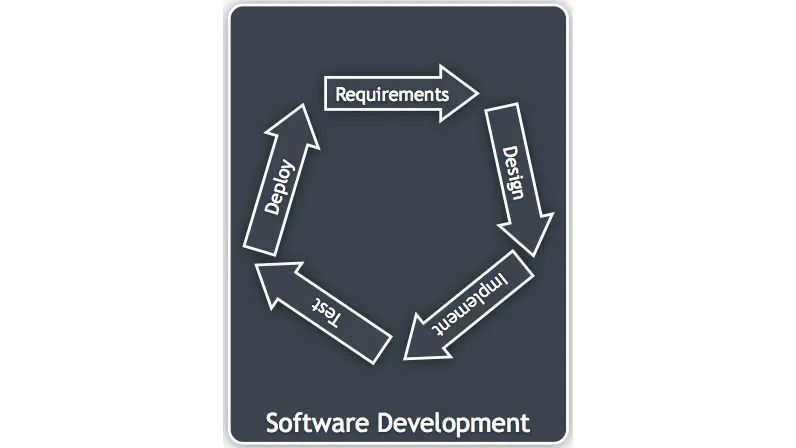
Figure 1.1: An example software development life cycle
Systems Development in Context
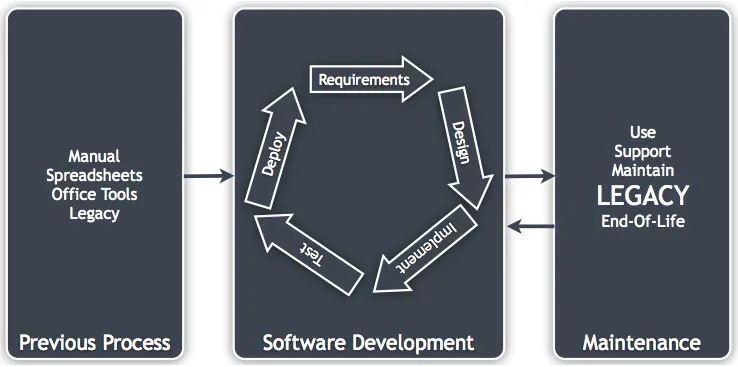
Figure 1.2: The life cycle in context
Systems Development Scaled with Time
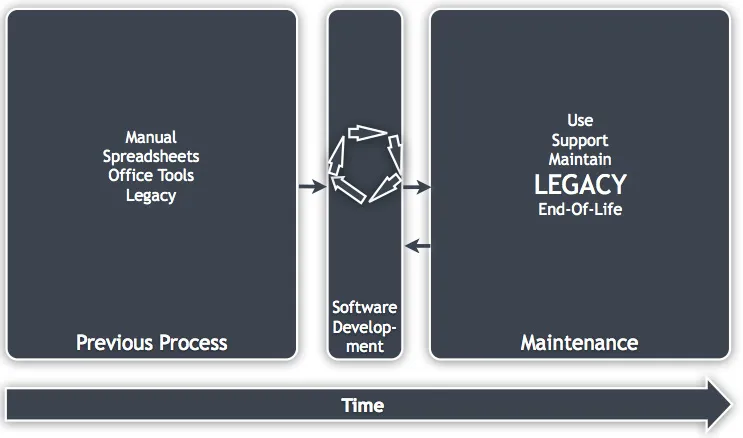
Figure 1.3: The life cycle in context and scaled with time
Line-of-Business Systems versus Others
Examples of Real Legacy Systems

Figure 1.4: © Dave Ross sourced from Wikimedia
- Between five and fifteen years old
- Without maintenance for two years
- Using out-of-date APIs or technologies
- Java 1.2/1.3/1.4 running under Solaris 8 on an Ultra Sparc III server using Oracle 8i
- C# 1.0, Windows server 2000 using SQL Server 2000
- Objective C on NeXT server
- J++/J#, VB6, FoxPro, Brokat Twister
- A combination of spreadsheets, macros, and shell scripts
Note
Common Issues
No Documentation
- Support systems may be retired, and information removed. This can happen when there is no obvious link from the documentation to the system it concerns.
- Documentation still exists but no one knows where it is or if it has been moved and the links/locations are not valid. This is a common problem when migrating document management systems.
- Information is in an uncommon or unknown format. It's amazing how many files end in .doc.
- Information was only ever stored locally (and the machines have been wiped) or not stored at all.
- Usernames and passwords: The direct users of the system and its administrators may know their access details but what about the system's sub-components? What about administrator access for the database or directory server? If these are lost, then performing maintenance actions can be incredibly difficult.
- Release instructions: Maybe you have the source code, but do you know how to build and release the software? Data is more likely to be kept than a running, unused service so your build and deploy server probably won't be present after 10 years. Was your build configuration in the source control system?
- Last release branch details: Which one of the multiple code branches or labels was released?
- Communication protocols: This is one of my personal bugbears. Many systems have been designed over the last 10 years to communicate with each other via XML messaging. Whereas developers used to document binary message formats, they've often not done so with XML as it's deemed to be 'human-readable' just because it's text-based. XML data blocks are rarely obvious, and they have so many optional elements that they are very difficult to reverse engineer. This is especially true if you only control one side of the communications, for example, receiving a message from an external source.
- Licenses and other legal agreements: I'm going to talk a little more about licenses later, but can you track down the legal information about how you can use the third-party software and hardware elements in your system? They may be more restrictive than you think.
- Users, including external systems: Do you know who your users are? What external systems rely on the one you control?
Lost Knowledge
Note
Table of contents
- Preface
- Chapter 1
- Chapter 2
- Chapter 3
- A
- B
Frequently asked questions
- Essential is ideal for learners and professionals who enjoy exploring a wide range of subjects. Access the Essential Library with 800,000+ trusted titles and best-sellers across business, personal growth, and the humanities. Includes unlimited reading time and Standard Read Aloud voice.
- Complete: Perfect for advanced learners and researchers needing full, unrestricted access. Unlock 1.4M+ books across hundreds of subjects, including academic and specialized titles. The Complete Plan also includes advanced features like Premium Read Aloud and Research Assistant.
Please note we cannot support devices running on iOS 13 and Android 7 or earlier. Learn more about using the app