- 244 pages
- English
- ePUB (mobile friendly)
- Available on iOS & Android
About this book
The first MATLAB® programming book written specifically for clinical radiotherapy medical physicists and medical physics trainees, this much-needed book teaches users how to create their own clinical applications using MATLAB®, as a complement to commercial software particularly when the latter does not cover specific local clinical needs.
Chapters explore key radiotherapy areas such as handling volumes, 3D dose calculation, comparing dose distributions, reconstructing treatment plans and their summations, and automated tests for machine quality assurance. Readers will learn to independently analyse and process images, doses, structures, and other radiotherapy clinical data to deal with standard and non-standard situations in radiotherapy. This book will also significantly improve understanding of areas such as data nature, information content, DICOM RT standard, and data flow. It will be an invaluable reference for students of medical physics, in addition to clinical radiotherapy physicists and researchers working in radiotherapy.
Features:
- Includes real clinical medical physics applications derived from actual clinical problems
- Provides commented MATLAB® scripts working with sample data and/or own data matching input requirements
- Promotes critical thinking and practical problem solving skills
Tools to learn more effectively

Saving Books

Keyword Search

Annotating Text

Listen to it instead
Information
1MATLAB Essentials and Principles of Simple Programming
All You Need to Start
MATLAB Interface
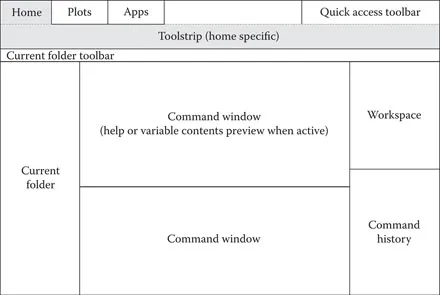
- The PLOTS and APPS tabs contain interactive applications to help guide the user through some specific activities such as plotting a selected variable or curve fitting
- However, working with MATLAB means giving commands in the Command Window. These commands can call MATLAB inbuilt functions, or, they can call scripts created by the user using the MATLAB (or any other text) editor following the MATLAB syntax
- Most of the commands create variables. All current variables including their basic properties are displayed in the Workspace Window
- Until deleted, commands entered in the Command Window are recorded in the Command History and can be navigated by using the dedicated window in the layout (alternatively, the UP and DOWN arrow key with or without specifying commands to search within by indicating first one or few letters, can be used for quick access to Command History from the Command Window directly)
- Folders and navigation helps in organizing an ...
Table of contents
- Cover
- Half Title Page
- Series Page
- Title Page
- Copyright Page
- Dedication
- Contents
- Foreword
- Preface
- About the Series
- Acknowledgements
- Definition of Terms
- Chapter 1 MATLAB Essentials and Principles of Simple Programming
- Chapter 2 Radiotherapy Physics Related Data Types and Basic Operations
- Chapter 3 Reconstructing Basic DICOM RT Data
- Chapter 4 Modifying DICOM Data in Radiotherapy
- Chapter 5 Simple 3D Plan Sum Using Rigid Registration
- Chapter 6 Handling Regions and Volumes of Interest in Radiotherapy
- Chapter 7 Three-Dimensional Dose Calculation in Radiotherapy
- Chapter 8 Semi-Automated Measurement of the Major Mechanical Parameters of Linacs
- Chapter 9 Comparing Dose DistributionsThe Gamma Method
- Chapter 10 Example of Accessory Modeling in Radiotherapy
- Index
Frequently asked questions
- Essential is ideal for learners and professionals who enjoy exploring a wide range of subjects. Access the Essential Library with 800,000+ trusted titles and best-sellers across business, personal growth, and the humanities. Includes unlimited reading time and Standard Read Aloud voice.
- Complete: Perfect for advanced learners and researchers needing full, unrestricted access. Unlock 1.4M+ books across hundreds of subjects, including academic and specialized titles. The Complete Plan also includes advanced features like Premium Read Aloud and Research Assistant.
Please note we cannot support devices running on iOS 13 and Android 7 or earlier. Learn more about using the app