- 454 pages
- English
- ePUB (mobile friendly)
- Available on iOS & Android
Azure Data Engineering Cookbook
About this book
Over 90 recipes to help you orchestrate modern ETL/ELT workflows and perform analytics using Azure services more easilyKey Features• Build highly efficient ETL pipelines using the Microsoft Azure Data services• Create and execute real-time processing solutions using Azure Databricks, Azure Stream Analytics, and Azure Data Explorer• Design and execute batch processing solutions using Azure Data FactoryBook DescriptionData engineering is one of the faster growing job areas as Data Engineers are the ones who ensure that the data is extracted, provisioned and the data is of the highest quality for data analysis. This book uses various Azure services to implement and maintain infrastructure to extract data from multiple sources, and then transform and load it for data analysis.It takes you through different techniques for performing big data engineering using Microsoft Azure Data services. It begins by showing you how Azure Blob storage can be used for storing large amounts of unstructured data and how to use it for orchestrating a data workflow. You'll then work with different Cosmos DB APIs and Azure SQL Database. Moving on, you'll discover how to provision an Azure Synapse database and find out how to ingest and analyze data in Azure Synapse. As you advance, you'll cover the design and implementation of batch processing solutions using Azure Data Factory, and understand how to manage, maintain, and secure Azure Data Factory pipelines. You'll also design and implement batch processing solutions using Azure Databricks and then manage and secure Azure Databricks clusters and jobs. In the concluding chapters, you'll learn how to process streaming data using Azure Stream Analytics and Data Explorer.By the end of this Azure book, you'll have gained the knowledge you need to be able to orchestrate batch and real-time ETL workflows in Microsoft Azure.What you will learn• Use Azure Blob storage for storing large amounts of unstructured data• Perform CRUD operations on the Cosmos Table API• Implement elastic pools and business continuity with Azure SQL Database• Ingest and analyze data using Azure Synapse Analytics• Develop Data Factory data flows to extract data from multiple sources• Manage, maintain, and secure Azure Data Factory pipelines• Process streaming data using Azure Stream Analytics and Data ExplorerWho this book is forThis book is for Data Engineers, Database administrators, Database developers, and extract, load, transform (ETL) developers looking to build expertise in Azure Data engineering using a recipe-based approach. Technical architects and database architects with experience in designing data or ETL applications either on-premise or on any other cloud vendor who wants to learn Azure Data engineering concepts will also find this book useful. Prior knowledge of Azure fundamentals and data engineering concepts is needed.
Tools to learn more effectively

Saving Books

Keyword Search

Annotating Text

Listen to it instead
Information
Chapter 1: Working with Azure Blob Storage
- Provisioning an Azure storage account using the Azure portal
- Provisioning an Azure storage account using PowerShell
- Creating containers and uploading files to Azure Blob storage using PowerShell
- Managing blobs in Azure Storage using PowerShell
- Managing an Azure blob snapshot in Azure Storage using PowerShell
- Configuring blob life cycle management for blob objects using the Azure portal
- Configuring a firewall for an Azure storage account using the Azure portal
- Configuring virtual networks for an Azure storage account using the Azure portal
- Configuring a firewall for an Azure storage account using PowerShell
- Configuring virtual networks for an Azure storage account using PowerShell
- Creating an alert to monitor an Azure storage account
- Securing an Azure storage account with SAS using PowerShell
Technical requirements
- An Azure subscription
- Azure PowerShell
Provisioning an Azure storage account using the Azure portal
Getting ready
How to do it…
- In the Azure portal, select Create a resource and choose Storage account – blob, file, table, queue (or, search for storage accounts in the search bar. Do not choose Storage accounts (classic)).
- A new page, Create storage account, will open. There are five tabs on the Create storage account page – Basics, Networking, Advanced, Tags, and Review + create.
- In the Basics tab, we need to provide the Azure Subscription, Resource group, Storage account name, Location, Performance, Account kind, Replication, and Access tier values, as shown in the following screenshot:
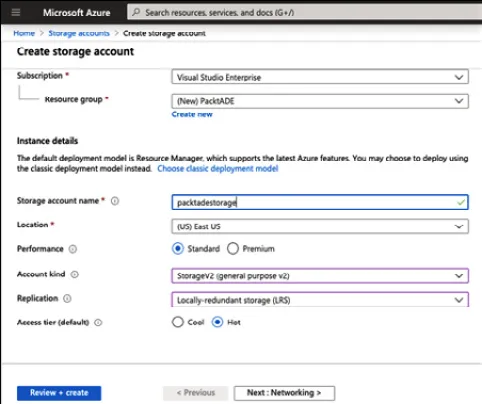 Figure 1.1 – The Create storage account Basics tab
 - In the Networking tab, we need to provide the connectivity method:
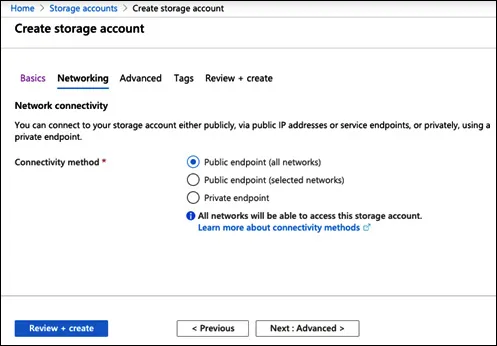 Figure 1.2 – Create storage account – Networking
 - In the Advanced tab, we need to select the Security, Azure Files, Data protection, and Data Lake Storage Gen2 settings:
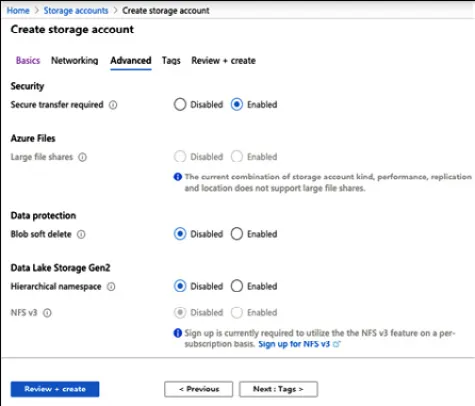 Figure 1.3 – Create storage account – Advanced
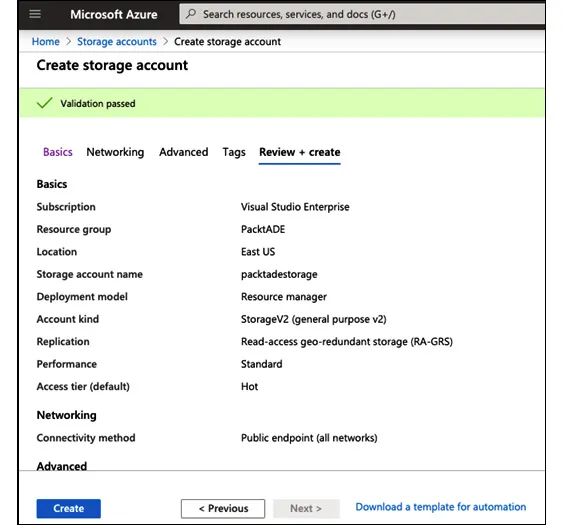
 - In the Review + create tab, review the configuration settings and select Create to provision the Azure storage account:
How it works…
Table of contents
- Azure Data Engineering Cookbook
- Contributors
- Preface
- Chapter 1: Working with Azure Blob Storage
- Chapter 2: Working with Relational Databases in Azure
- Chapter 3: Analyzing Data with Azure Synapse Analytics
- Chapter 4: Control Flow Activities in Azure Data Factory
- Chapter 5: Control Flow Transformation and the Copy Data Activity in Azure Data Factory
- Chapter 6: Data Flows in Azure Data Factory
- Chapter 7: Azure Data Factory Integration Runtime
- Chapter 8: Deploying Azure Data Factory Pipelines
- Chapter 9: Batch and Streaming Data Processing with Azure Databricks
- Other Books You May Enjoy
Frequently asked questions
- Essential is ideal for learners and professionals who enjoy exploring a wide range of subjects. Access the Essential Library with 800,000+ trusted titles and best-sellers across business, personal growth, and the humanities. Includes unlimited reading time and Standard Read Aloud voice.
- Complete: Perfect for advanced learners and researchers needing full, unrestricted access. Unlock 1.4M+ books across hundreds of subjects, including academic and specialized titles. The Complete Plan also includes advanced features like Premium Read Aloud and Research Assistant.
Please note we cannot support devices running on iOS 13 and Android 7 or earlier. Learn more about using the app